Mutfak Dolapları İçin Kesim Listesi Nasıl Oluşturulur

Mutfak dolabı kesim listesi, bir dolap dizisi için kesmeniz gereken her panelin eksiksiz dökümüdür: yanlar, üstler, altlar, raflar, arkalıklar, çekmece kutuları ve kapaklar; her biri tam genişliği, yüksekliği, malzemesi ve adediyle. Listeyi testereye dokunmadan önce doğru hazırlarsanız, malzeme faturanızdan tipik olarak %15 ila %25 kısarsınız ve mobilyacılığın en pahalı hatalarından kaçınırsınız: yanlış ölçülmüş paneller ve unutulmuş parçalar. İş akışı asla değişmez; ister tek bir eviye altı dolabı yapın ister 15 dolaplık tam bir mutfağı kurun: odayı ölçün, yerleşimi planlayın, her parçayı doğru pay düşümleriyle listeleyin, levha yerleşimini optimize edin, sonra etiketli kesim sayfalarını atölyeye aktarın. Bu kılavuz beş adımın tamamını anlatıyor ve gerçek bir koridor mutfağı için baştan sona işlenmiş bir örnekle bitiyor; böylece rakamları uçtan uca görebilirsiniz.
Bir mutfak dolabının anatomisi
Parçaları listeleyebilmeniz için önce bir dolabın nelerden oluştuğunu bilmeniz gerekir. Alt, üst ve boy dolapların hepsi aynı iskeleti paylaşır; yalnızca ölçüler değişir.
Standart bir çerçevesiz (Avrupa tipi) alt dolap gövdesi şu parçalardan oluşur:
- İki yan panel (gövde yanları): kutunun düşey duvarları; 18 mm gövde malzemesinden kesilir. Çerçevesiz bir kutuda yanlar en dıştaki panellerdir, bu yüzden tam derinlik boyunca uzanır ve diğer her şey aralarına oturur.
- Üst kayıtlar veya tam bir üst panel: alt dolapta 100 mm'lik iki kayıt (üzerine tezgah oturabilsin diye), üst dolapta ise tam bir panel.
- Alt panel: kutunun tabanı; yanların arasına oturur.
- Arka panel: daha ince 6 mm veya 12 mm malzeme; kutuyu gönyeye almak için bir kinişe geçirilir ya da arka kenarlara çakılır.
- Raflar: sabit ya da ayarlanabilir; temiz insin diye iç genişlikten 2 ila 3 mm eksik kesilir.
- Ön çerçeve (isteğe bağlı): önden geçen masif ahşap çerçeve; Amerikan tipi dolaplarda standarttır, çerçevesiz kutularda bulunmaz.
Çekmece kutuları her biri için beş parça ekler: iki yan, bir ön, bir arka ve bir taban. Bunları eksik saymak çok kolaydır, o yüzden en baştan çarparak sayın: üç çekmeceli bir alt dolap gövdenin üstüne 15 parça, dört çekmeceli bir blok 20 parça ekler.
Kapaklar ve çekmece ön panelleri ayrı kesilir; düz (slab) bir görünüm için genellikle aynı levha malzemesinden, boyanacaklarsa MDF'den. MDF'de doku olmadığı ve boyayı kusursuz kabul ettiği için birçok üretici gövdeleri huş veya melamin kontrplaktan, kapakları MDF'den yapar. Malzeme seçiminin verimi nasıl değiştirdiğini kontrplak kesim listesi kılavuzumuzda anlatıyoruz.
Listenizi en baştan malzeme ve kalınlığa göre gruplayın. Tipik bir mutfak üç grup üretir: 18 mm gövde kontrplağı, 6 mm sert lif arkalıklar ve 18 mm MDF kapaklar. Her grup kendi stok levhasına göre optimize edilir, bu yüzden hepsini tek bir çalıştırmada karıştırmak kullanılamaz sonuçlar verir.
Adım 1: Mutfağınızı ölçün
Doğru ölçüler bütün listenin temelidir. Duvar uzunluğunda 5 mm'lik bir hata, bir dolap dizisini pencerenin önüne taşıyabilir ya da temiz kapatamayacağınız bir boşluk bırakabilir. Şunları ölçün:
- Duvar uzunlukları: üç yükseklikte (zemin, duvar ortası, tavan) ölçün ve en kısa değeri kullanın. Duvarlar nadiren tam gönyesinde ve şakulündedir.
- Tavan yüksekliği, boy dolaplarınızın üst sınırını belirler ve alt ile üst dolaplar arasındaki mesafeyi tayin eder.
- Engeller: pencereler, borular, prizler, radyatörler ve varsa taşıyıcı kolonlar. Krokinizde tam konumlarını işaretleyin.
- Cihaz boşlukları: bir bulaşık makinesi kabaca 600 mm ister; fırın, buzdolabı ve ocakların her birinin üretici föyünde kendi boşluk değeri vardır. Boşlukları tasarlayın, tahmin etmeyin.
Standart gövde ölçüleri size güvenilir bir başlangıç noktası verir. Aşağıdaki tablo yaygın metrik mutfak ölçülerini yansıtır; kendi tezgahınıza ve cihazlarınıza göre uyarlayın.
| Dolap tipi | Derinlik | Yükseklik | Tipik genişlikler |
|---|---|---|---|
| Alt dolap | 560 ila 600 mm | 720 mm gövde + 150 mm süpürgelik | 300, 400, 450, 500, 600, 800, 900 mm |
| Üst dolap | 300 ila 350 mm | 720 ila 900 mm | 300 ila 1000 mm |
| Boy / kiler dolabı | 560 ila 600 mm | 1970 ila 2300 mm | 500 ila 600 mm |
| Çekmeceli blok | 560 ila 600 mm | 720 mm gövde | 400 ila 900 mm |
Bitişik dolaplar arasında ve duvar dibinde, duvara uydurma ve ayar payı için 2 ila 3 mm boşluk bırakın. Önemsiz görünür, ama on dolaplık bir dizide bunu atlarsanız 20 ila 30 mm hata biriktirirsiniz; bu da çoğu zaman son ünitenin sığmaması için yeterlidir.
Adım 2: Dolap yerleşiminizi planlayın
Oda ölçüldükten sonra ölçekli bir kroki çizin ve her konuma bir dolap atayın. Her üniteyi numaralandırın (B1, B2, W1 gibi), çünkü bu numaralar atölye zemininde birbirine benzeyen 200 dikdörtgeni düzenli tutan etiketlere dönüşür. Tipik bir L şeklindeki mutfakta 12 ila 16 alt dolap, 8 ila 12 üst dolap ve 1 veya 2 boy dolabı bulunur; arkalıkları, rafları, çekmeceleri ve kapakları da saydığınızda bu 150 ila 250 ayrı parça eder. (Ücretsiz plan hesaplama başına en fazla 150 parça kabul eder — bu aralığın üst ucundaki tam bir mutfak, işi birden fazla çalıştırmaya bölmek, en doğal haliyle malzeme grubu başına bir çalıştırma yapmak ya da Pro'ya geçmek demektir).
Yapım yönteminize şimdi karar verin, çünkü bir sonraki adımdaki bütün pay düşümlerini o belirler. İki yaygın seçenek şunlardır: kinişli arkalık (arka panel bir kanala oturur, yanlar tam derinlikte kalır) veya yanların arasına oturan arkalık. Hangisini seçerseniz seçin, aynı şekilde her dolaba uygulayın.
Adım 3: Her parçayı listeleyin
Şimdi dolap dolap ilerleyin ve her bileşeni bitmiş genişliği ve yüksekliğiyle yazın. Buradaki kritik beceri pay düşümüdür: bir dolabın toplam genişliği, içindeki panellerin genişliği değildir. 560 mm derinliğinde, 720 mm yüksekliğinde, 18 mm yanlara ve yanların arasına oturan bir alta sahip çerçevesiz 600 mm'lik bir alt dolapta, 18 mm kontrplaktan çıkacak parçalar şunlardır:
- 2x Yan panel: 560 x 720 mm (tam gövde derinliği x gövde yüksekliği, çünkü yanlar dış duvarlardır)
- 1x Alt panel: 564 x 560 mm (564 = 600 - 2 x 18, yani yanlar arasındaki genişlik)
- 2x Üst kayıt: 564 x 100 mm
- 1x Raf: 562 x 540 mm (rahat insin diye iç genişlikten 2 mm eksik, önden ve arkadan geride tutulur)
Ve 6 mm sert liften:
- 1x Arka panel: 598 x 718 mm (kinişe oturacak ölçüde, dış ölçülerden birkaç mm küçük)
En sık yapılan kesim listesi hatası iç ölçülerle toplam ölçüleri karıştırmaktır; bu yüzden tek bir referans seçin (ben toplam/dış ölçüyü kullanıyorum) ve her iç parçayı hep aynı aritmetikle ondan türetin. Bunu ve diğer sık yapılan yanlışları en yaygın kesim listesi hataları yazımızda ayrıntılı ele alıyoruz.
Gövdenin dışında kalan parçaları da unutmayın:
- Dolgu çıtaları: duvardaki veya dolaplar arasındaki boşluğu kapatmak için 50 ila 100 mm genişliğinde.
- Yan kapak panelleri: görünen bir yan panelin üzerine gelen dekoratif kaplamalar; çoğu zaman kapak malzemesinden.
- Süpürgelikler (plint): dizi boyunca 150 mm yüksekliğinde; çoğu zaman artıklardan çıkarılır.
- Korniş ve alt bordür (pelmet): tasarımınızda varsa.
- Çekmece kutuları: her biri beş parça; her listede en çok eksik sayılan kalem.
Uygulamalı örnek: 9 dolaplı bir koridor mutfağı
Somutlaştırmak için yakın zamanda planladığım tam bir diziyi aktarayım: beş alt dolap, üç üst dolap ve bir boy kiler dolabından oluşan bir koridor mutfağı; 18 mm huş kontrplaktan çerçevesiz gövdeler, 6 mm sert lif arkalıklar ve 18 mm MDF düz kapaklar. Optimize etmeden önce kendi listenizin ulaşması gereken ayrıntı düzeyi budur.
| Ünite | Tip | 18 mm gövde parçaları | 6 mm arkalık | 18 mm MDF kapaklar |
|---|---|---|---|---|
| B1 | 800 eviye altı | 2 yan, alt, 2 kayıt | 1 | 2 kapak |
| B2 | 500 tek kapaklı | 2 yan, alt, 2 kayıt, 1 raf | 1 | 1 kapak |
| B3 | 500 üç çekmeceli | 2 yan, alt, 2 kayıt | 1 | 3 çekmece ön paneli |
| B4 | 600 tek kapaklı | 2 yan, alt, 2 kayıt, 1 raf | 1 | 1 kapak |
| B5 | 400 tek kapaklı | 2 yan, alt, 2 kayıt, 1 raf | 1 | 1 kapak |
| W1 ila W3 | Üst dolaplar | Her birinde 2 yan, üst, alt, 1 raf | Her birinde 1 | Her birinde 1 kapak |
| T1 | 600 kiler | 2 yan, üst, alt, 4 raf | 1 | 2 kapak |
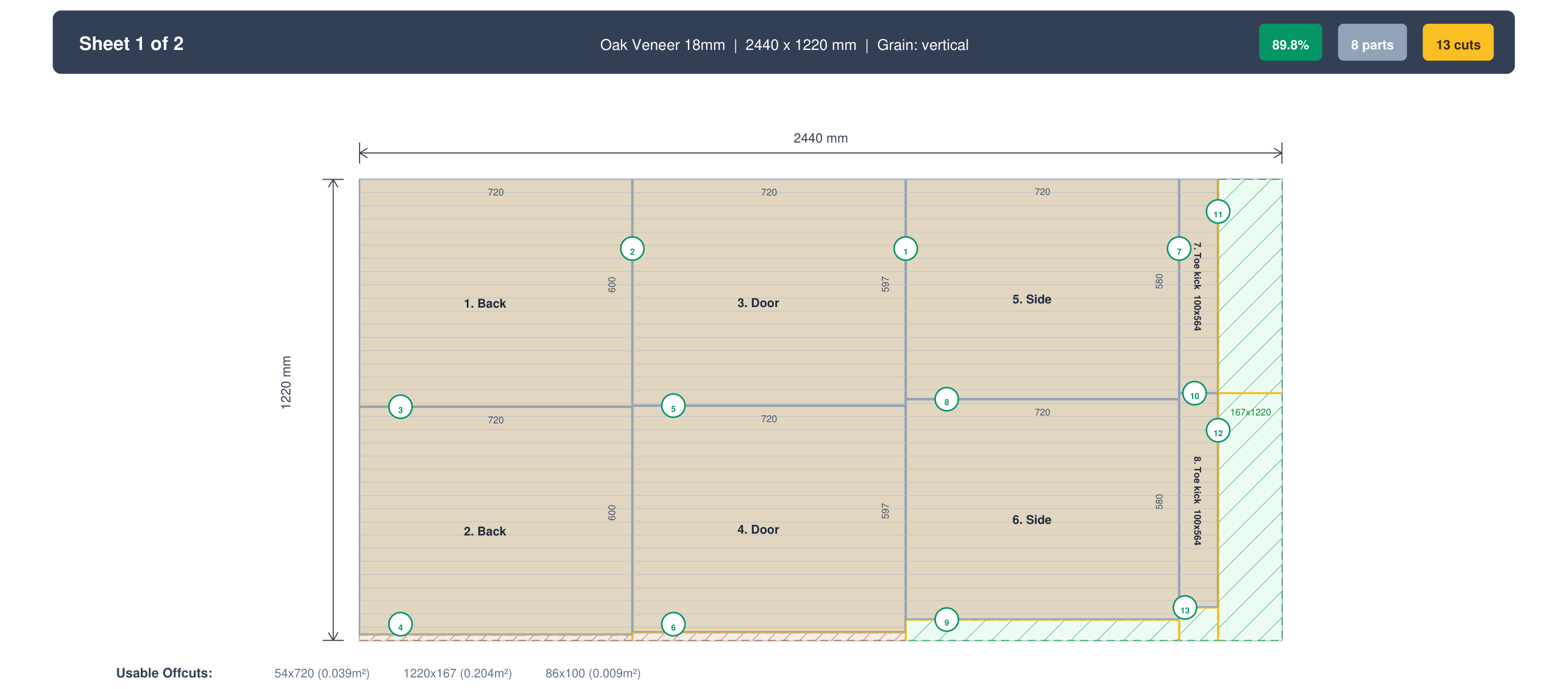
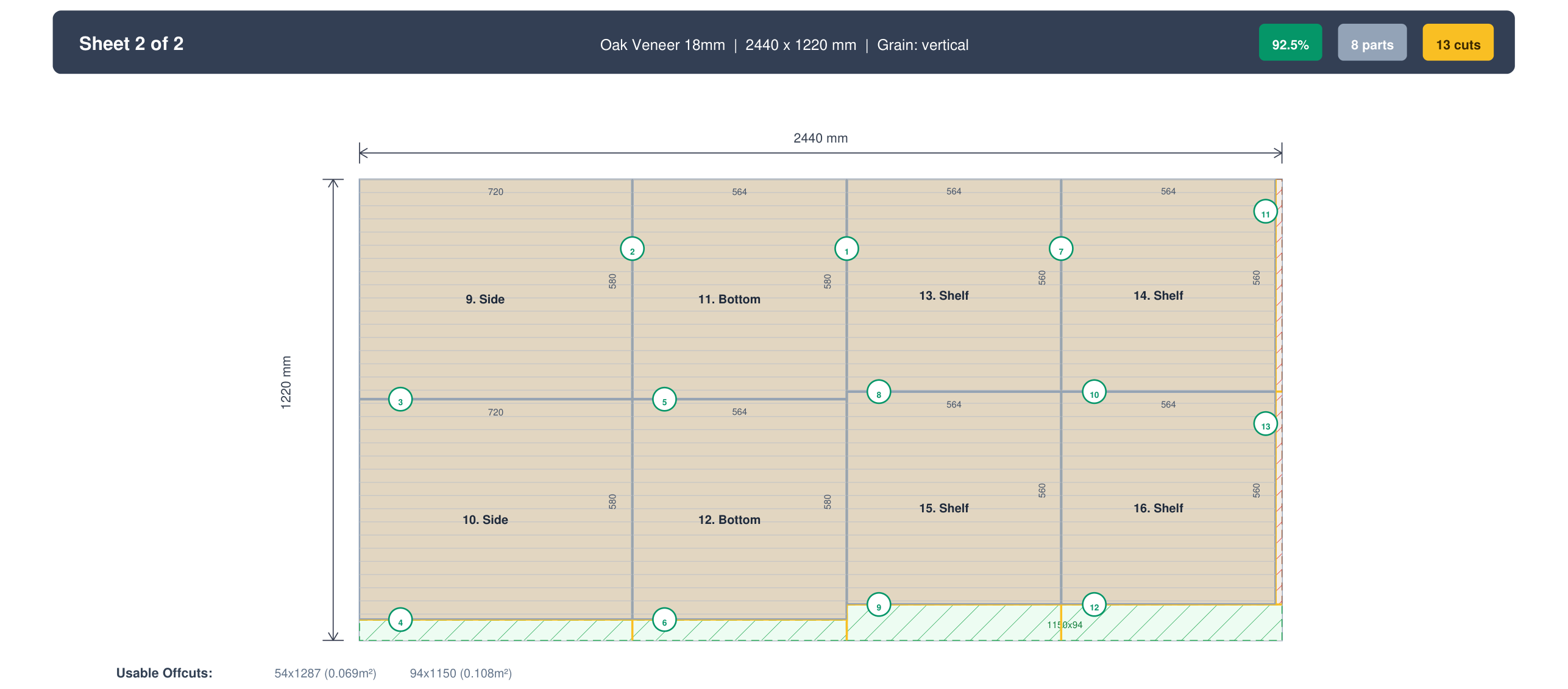
Hepsini saydığımızda bu mutfaktan 51 gövde paneli, 9 sert lif arkalık ve 13 MDF kapak çıktı; buna işteki tek çekmece bloğu için 15 çekmece kutusu parçası (kontrplak artıklarından kesildi) eklenince, levha bazında optimize edilen üç malzeme grubuna yayılmış kabaca 88 parça etti. 2440 x 1220 mm levhalar, 3 mm kesim payı (kerf) ve görünen yan panellerde kilitli doku yönüyle (MDF kapakların kilitlenecek bir dokusu yoktur) bir optimize ediciye girildiğinde yerleşim şuna oturdu: %89 verimlilikle 18 mm huş kontrplaktan beş levha, arkalıklar için 6 mm sert liften iki levha ve kapaklar için 18 mm MDF'den iki levha. Toplamda dokuz levha.
Karşılaştırma olsun diye: aynı parçalar için elle çizdiğim ilk yerleşim 18 mm kontrplaktan yedi levha kullanıyordu, çünkü çekmece parçalarıyla kiler raflarını gözle boşluklara oturtmayı beceremedim. Tanesi 70 dolardan fazladan iki levha, tek bir mutfakta 140 dolarlık önlenebilir fire demek; optimize edici ise daha iyi yerleşimi bir dakikadan kısa sürede buldu. Kesmeden önce kesimi planlamanın bütün gerekçesi bu farktır.
Adım 4: Levha yerleşimini optimize edin
80'den fazla parçayı stok levhalara en az fireyle yerleştirmek bir bin-packing problemidir ve bir düzine parçayı geçtiğinizde bunu elle yapmak hem yavaş hem de israflıdır. Bir kesim listesi optimize edici aynı işi saniyeler içinde yapar. Bir mutfağı CutPlan'da baştan sona işlemek için:
- Parçaları malzeme ve kalınlığa göre gruplayarak girin, yukarıdaki gibi dolap adlarıyla. Üç grubu (gövde, arkalıklar, kapaklar) ayrı tutun.
- Stok levha ölçünüzü ayarlayın. Çoğu bölgede 2440 x 1220 mm bulunur, ama tedarikçinize doğrulatın, çünkü levha boyutları ülkeye göre değişir.
- Testere kesim payını girin. Masa testeresinde 3 mm kesim payı, panel testeresinde 4 mm normaldir; optimize edici böylece her kesimin götürdüğü malzemeyi düşer.
- Görünen parçalarda doku yönünü kilitleyin: yan paneller, yan kapak panelleri ve kaplamalı kapaklar (kilit yalnızca doku yönü atanmış parçaları, o da dokusu olan bir stok üzerinde bağlar — yeni levhalar varsayılan olarak dikey dokuya sahiptir, dolayısıyla kutudan çıktığı gibi çalışır). Rafları, kayıtları ve arkalıkları serbestçe dönebilecek şekilde bırakın ki yerleştirici boşlukları doldurabilsin.
- Çalıştırın ve levha sayısını okuyun. Derli toplu bir mutfak listesi %85 ila %92 verimlilik civarına oturur; CutPlan her malzeme grubunun tam olarak kaç levha gerektirdiğini bildirir.
Adım 5: Dışa aktarın ve kesin
Yerleşim doğru göründüğünde, testerenize uyan biçimde tezgaha gönderin:
- PDF, masa veya panel testeresinde elle kesim için: levha başına bir sayfa, her parça dolap numarası ve bitmiş ölçüsüyle etiketli.
- DXF (bir Pro dışa aktarması), parça koordinatlarını doğrudan dosyadan okuyan CNC freze veya yatar panel ebatlama testeresi için.
- CSV, levhaları sizin için tedarikçi kesiyorsa ve yalnızca parça listesine ihtiyacı varsa.
Önce gövde panellerini, sonra arkalıkları, en son kapakları kesin; her parçanın etiketini testereden çıktığı anda panelin üzerine yazın. 18 mm artıkları süpürgelikler ve dolgu çıtaları için ayırın; bunlar genellikle yerleştiricinin tam bir panelle dolduramadığı fire alanlarına düşer. Bunu yaparsanız, birbirinin aynı 88 dikdörtgen gibi görünen bir mutfak kendini doğru sırayla monte eder.
Kesim listenizi optimize etmeye hazır mısınız?
Ücretsiz, tarayıcıda, kurulum gerektirmez. Parçalarınızı yapıştırın ve saniyeler içinde optimize edilmiş bir düzen elde edin.
Optimizer'ı Aç →Sıkça sorulan sorular
10 mutfak dolabı için kaç levha kontrplak gerekir?
Karışık alt ve üst ünitelerden oluşan on dolap için, kapaklar ve çekmece önleri hariç, kabaca beş ila yedi levha 18mm gövde malzemesi artı arkalıklar için iki levha 6mm sert lif levha bekleyin. Yukarıdaki işlenmiş koridor mutfak, beş alt ünite, üç üst ünite ve bir boy kiler dolabı, 51 gövde paneline ulaştı ve %89 kullanımla beş levha 18mm huş kontrplak, iki levha 6mm sert lif levha ve düz önler için iki levha 18mm MDF olarak çözüldü; toplam dokuz levha. Gerçek rakam dolap genişliğine, kaç çekmece grubu yaptığınıza (her çekmece kutusu beş parça ekler), kilerin tam boy olup olmadığına ve ne kadar doku kilitlediğinize göre oynar; bu yüzden her kaba kuralı yalnızca bir sipariş tahmini olarak görün. Malzeme grubu başına kesin bir sayı için parçaları bir optimize ediciye girin, sonra yırtılma ve yanlış ölçümler için gövde malzemesinden bir yedek levha ekleyin.
Dolap gövdelerinde kontrplak mı MDF mi kullanmalıyım?
Kutular için kontrplak kullanın. Daha hafiftir, kenarda vidayı çok daha iyi tutar ve eviyenin altındaki ara sıra gelen sıçramaya aldırmaz; bu da yük taşıyan yanlar ve raflar için önemlidir; MDF kenarları vida çevresinde ufalanır ve ıslanırsa şişer. MDF'yi boyanacak kapaklar ve ön paneller için saklayın; oradaki dümdüz ve dokusuz yüzey boyanın altında tam olarak istediğiniz şeydir ve her panel gövdeyi gönyesinde tutması istenmeden yalnızca menteşelere asılır. Bu ayrım, tipik bir mutfak listesinin üç malzeme grubuna sahip olmasının nedenidir: 18mm gövde kontrplağı, 6mm sert lif arkalıklar ve 18mm MDF önler. Melamin kaplı levhalar, hazır yüzeyli geldikleri ve kenar bandı dışında hiçbir şey gerektirmedikleri için üretim atölyelerinde yaygın bir gövde seçimidir, ancak düz kontrplaktan daha ağırdırlar. Ne seçerseniz seçin, düşümler her dolap için aynı kalsın diye tüm dizide tek bir gövde malzemesi kullanın.
Dolap yanlarında doku hangi yöne gitmeli?
Görünen her yan panelde ve kaplamalı önlerde dikey olarak, yukarıdan aşağıya; böylece dolap dizisi bazadan yukarı tek bir sürekli doku gibi okunur. Göz döndürülmüş bir yan paneli anında seçer, özellikle yan panelin bir kapağın yanına oturduğu dizi sonunda, ve hiçbir ölçü hassasiyeti bunu gizlemez. Boyanacak MDF önlerin kilitlenecek bir dokusu yoktur, bu yüzden onları serbest bırakın. Optimize edicinizde bu doku yönünü yalnızca görünen yüzeyler için kilitleyin ve rafları, kayıtları, tabanları, arkalıkları ve çekmece kutusu parçalarını serbestçe dönebilecek şekilde bırakın; bu, kısıt yüzünden başka türlü kaybedeceğiniz verimin çoğunu geri kazandırır. Kilit yalnızca dokusu ayarlanmış parçaları, dokusu olan stokta bağlar; yeni levhalar varsayılan olarak dikey dokuludur, bu yüzden kutudan çıktığı gibi çalışır. İşlenmiş koridor mutfakta doku yalnızca görünen yan panellerde kilitlendi ve gövde kontrplağı yine %89 kullanımla çözüldü.
Parça ölçülerimden kenar bandını düşmeli miyim?
Bitmiş panelin hedef ölçüsünü tutturmasını istiyorsanız evet. Bant, kapladığı her kenara kendi kalınlığını ekler, bu yüzden bitmiş ölçüye kesilen bir parça bant takıldığında büyük çıkar. Karşılıklı iki kenarda 2mm bant için parçayı o boyutta 4mm küçük girin; yalnızca bir kenarı bantlıyorsanız tek bir bant kalınlığı düşün. Buna bütün mutfak için bir kez karar verin, kuralı listenizin başına yazın ve her kapağa, çekmece önüne ve açıkta kalan yan panele tutarlı uygulayın, çünkü bir dizi boyunca her kapakta unutulan 2mm gözle görülür fuga sorunlarına, önler arasında eşit olmayan boşluklara ve komşularına sürten kapaklara dönüşür. Hiç bantlanmayan gizli gövde kenarları hiçbir düşüm gerektirmez. Testere başında kimse ikinci kez uygulamasın diye düşümü listede her bantlı parçanın yanına not edin.
Mutfak dolapları için kesim listesini nasıl hazırlarım?
Bitmiş dolap ölçülerinden başlayıp içe doğru parçalara ilerleyin. Mutfağı ölçün, alt ve üst dolap dizisine karar verin ve her dolaba bir toplam yükseklik, genişlik ve derinlik verin. Sonra her dolabı panellerine ayırın: iki yan, bir üst ya da üst kayıtlar, bir taban, bir arkalık, raflar ve varsa kapaklar ile çekmece önleri; her birini uzunluğu, genişliği, kalınlığı, adedi ve malzemesiyle bir satır olarak yazın. Ölçüler basit çıkarmadan gelir; yani bir raf dolap genişliği eksi iki yan kalınlığıdır ve bir arkalık kapattığı gövdeye göre ölçülendirilir. Görünen yüzlerde doku yönünü ve parçanın yanına varsa kenar bandı düşümünü not edin. Her dolap için tekrarlayın, sonra satırları malzeme ve kalınlığa göre gruplayın, çünkü gövdeler ve arkalıklar farklı stoktan kesilir. O tablo kesim listesidir; bir optimize ediciden geçirmek onu, yukarıdaki işlenmiş koridor mutfağın gösterdiği gibi, levha levha bir yerleşime dönüştürür.