Saw Kerf: What It Is, Blade Kerf Widths & How to Set It

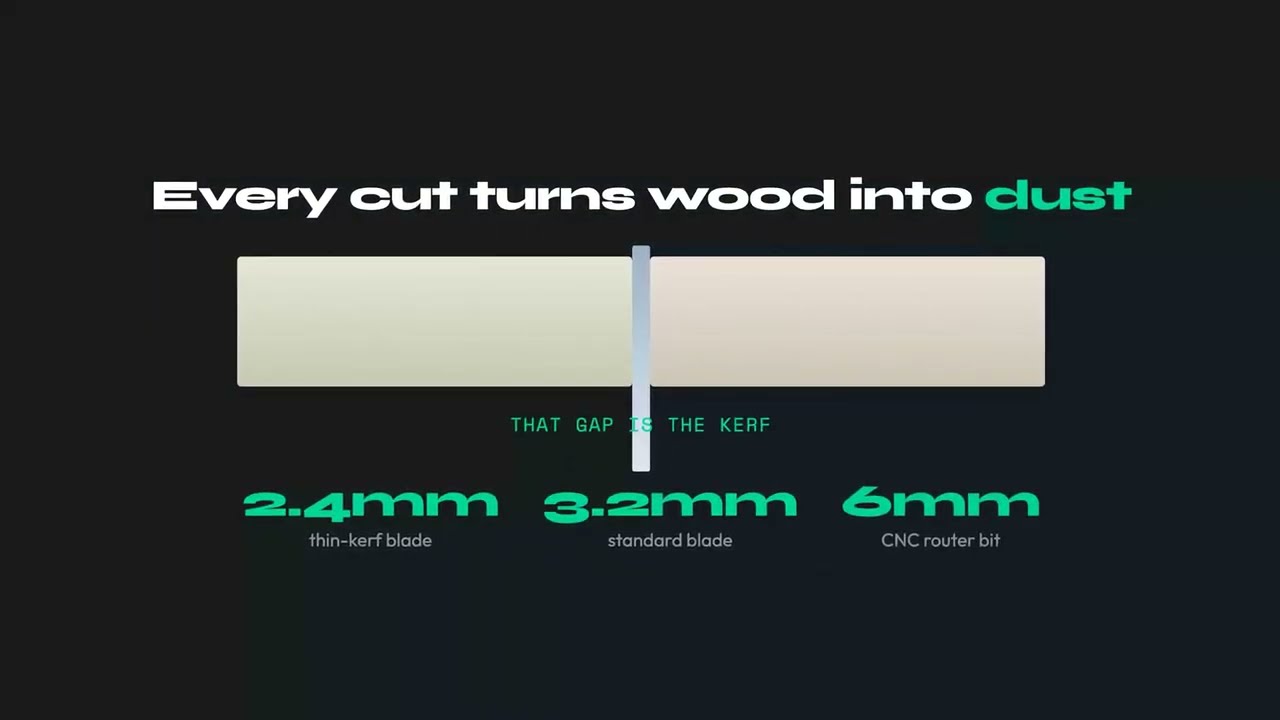
Saw kerf is the width of material a blade turns into sawdust on every pass, which is why a cut is never zero-width. For most woodworking blades the kerf is 2.0 to 3.2mm (roughly 3/32 to 1/8 inch): the exact figure depends on the blade body plus how far its teeth are set. It sounds trivial, but it is the single most overlooked number in a cut list. Ignore a 3mm kerf across a few dozen cuts and you can quietly lose a whole part, or an entire sheet, without a single measurement looking wrong.
This guide covers what kerf actually is, real kerf widths for every common tool, a worked example of how a tiny number costs a full sheet, how to measure your own blade, and how to set kerf correctly so your cut list stays honest.
What Is Saw Kerf?
When a blade passes through a sheet it does not simply split it into two pieces. It grinds away a thin channel of material and throws it out as dust and chips. That channel is the kerf, and the width of the channel is the kerf width. Everything inside it is gone permanently. You cannot get it back, and you cannot cut two parts to share it.
Kerf width is set by two things working together:
- Plate (body) thickness: the flat steel disc of the blade, usually 1.6 to 2.4mm on a table saw blade.
- Tooth set: the carbide teeth are wider than the plate, either bent outward or ground proud of the body, so the blade clears its own path and does not bind or burn. The teeth are what actually define the finished slot.
This is why kerf is always wider than the plate. A common mistake is to read the plate thickness off the blade and enter that as kerf: the real cut is 0.4 to 0.8mm wider than the body. Kerf is also completely different from scoring or scribing, where a shallow blade removes little or no width, and from a laser, which vaporizes only a hair of material.
Saw Kerf Widths by Tool: A Reference Table
Kerf varies more than most people expect, from a fraction of a millimetre on a fine Japanese pull saw to nearly 5mm on an industrial beam saw. The ranges below are the real-world figures you should plan around. Always measure your own blade before a tight job, but this is a reliable starting point.
| Tool / Blade | Typical kerf (mm) | Typical kerf (inch) |
|---|---|---|
| Table saw, full-kerf (10") | 3.0 to 3.2mm | ~1/8" |
| Table saw, thin-kerf | 2.0 to 2.4mm | ~3/32" |
| Circular saw (7-1/4") | 2.2 to 3.2mm | ~3/32" to 1/8" |
| Track / plunge saw | 1.8 to 2.4mm | ~1/16" to 3/32" |
| Miter / chop saw | 2.4 to 3.2mm | ~3/32" to 1/8" |
| Jigsaw | 1.5 to 2.5mm | ~1/16" to 3/32" |
| Band saw (resaw / narrow) | 0.8 to 1.8mm | ~1/32" to 1/16" |
| Japanese pull saw / fine hand saw | 0.3 to 0.6mm | ~1/64" to 1/32" |
| Industrial panel / beam saw (main blade) | 3.5 to 4.8mm | ~9/64" to 3/16" |
| Panel saw scoring blade | matched to main blade, runs a hair wider | - |
| CNC router bit (1/8" / 3mm) | 3.0 to 3.2mm | 1/8" |
| CNC router bit (1/4" / 6mm) | 6.0 to 6.4mm | 1/4" |
| Laser cutter (thin plywood) | 0.1 to 0.4mm | negligible |
Two entries surprise people. A CNC router has no saw blade, but the bit removes a slot equal to its full diameter, so a 6mm bit has a 6mm kerf, wider than any saw. A panel saw scoring blade makes a shallow pre-cut on the underside so the main blade does not chip the laminate, and it is deliberately set a fraction wider than the main blade, not narrower. For layout math, the main blade width is the number that counts.
Which Kerf to Set for Which Material
The tool table above tells you what a blade removes. The question people actually search for is the other way round: I am cutting this material, which blade and which kerf value do I plan around? The figures below are the common shop setups, with the value to type into the kerf field of your optimizer. Measure once on a scrap of the real material if the job is tight.
| Material | Usual blade or tool | Kerf to set | Why |
|---|---|---|---|
| Melamine, laminated chipboard | Full-kerf 80T triple-chip (TCG), or panel saw with scoring blade | 3.2mm (1/8") | Stiff plate and a scoring pass stop the laminate chipping; thin-kerf blades flutter in dense board |
| Plywood, veneered panels | 60 to 80T ATB, full or thin kerf | 2.4 to 3.2mm | High tooth count for a clean face veneer; thin-kerf is fine on a track saw |
| MDF, HDF | Full-kerf 60T or more | 3.0 to 3.2mm | Dense and abrasive; a full plate runs cooler and straighter |
| Solid wood, ripping | 24 to 30T flat-top or ATB; thin-kerf on smaller saws | 2.4 to 3.2mm | Low tooth count clears chips; go thin-kerf only if the saw is under 2 HP |
| Solid wood, crosscutting | 60 to 80T ATB, miter saw or table saw | 2.4 to 3.2mm | Fine teeth for tear-out-free ends; kerf follows the blade you own |
| Aluminium, non-ferrous metal | TCG, negative hook, non-ferrous blade | 3.0 to 3.2mm | Negative hook stops the blade grabbing; always a full-kerf plate |
| Acrylic, polycarbonate, plastics | TCG or fine ATB, low hook; laser for thin sheet | 2.4 to 3.2mm saw, 0.1 to 0.3mm laser | Slow feed avoids melting; laser kerf is small enough to round to 0 on rough layouts |
| Fabric, vinyl, leather (roll goods) | Rotary cutter, shears or straight knife | 0mm | A blade parts the material without removing any; set kerf to zero and plan spacing as seam allowance instead |
| Sheet metal, steel plate | Plasma, fibre laser or waterjet | 0.2mm laser, 1 to 2mm plasma, ~1mm waterjet | Kerf depends on nozzle and thickness; the machine spec sheet is the number to use |
The pattern is simple: dense or brittle sheet goods want the stiffest plate you have, so plan on a full 3.2mm; solid wood on a modest saw is where a thin-kerf blade pays back; and anything cut with a knife or a laser is effectively a zero-kerf job. Whichever row you are in, the value belongs in the optimizer before you press calculate, not in your head at the saw.
How Kerf Compounds: The Hidden Extra Sheet
Here is where kerf stops being trivia. Suppose you need eight parts, each 305mm long, cut across a standard 2440mm sheet.
On paper the math is beautiful: 8 x 305mm = 2440mm. A spreadsheet, or any cut list that ignores kerf, reports one sheet with zero waste. A perfect, exact fit.
Now add a real blade. Between eight parts there are seven cuts, and each cut eats 3mm:
8 x 305mm + 7 x 3mm = 2440 + 21 = 2461mm
That is 21mm longer than the sheet. The eighth part does not exist. Your blade turned it into 21mm of sawdust spread invisibly across seven cuts. In reality you get seven parts per sheet, not eight, and nothing in your spreadsheet warned you.
Now scale it to a real job. Say the project needs 32 of those parts:
- Kerf ignored: 32 / 8 = 4 sheets.
- Kerf included: 7 per sheet, so 32 / 7 = 4.57, which rounds up to 5 sheets.
One extra sheet, about 25% more material, from a number smaller than a matchstick. On expensive hardwood plywood that single oversight can cost more than a premium blade, which is why optimizing a plywood cut list pays for itself on the first project. This example is illustrative, but the mechanism is exactly how kerf errors show up in the shop: never as one big mistake, always as a slow leak that surfaces at the last cut or the last sheet.
A real optimizer applies this same logic in two dimensions, reserving the kerf on every gap between neighbouring parts on the sheet, not just a single row of rips. That is why a manual sketch that "looks like it fits" so often does not. For the full picture of how packing decisions and kerf interact, see the complete guide to cut list optimization, and if you are deciding what stock to buy, the standard sheet sizes guide pairs well with kerf-aware planning.
How to Measure Your Real Kerf (Do Not Trust the Label)
Printed blade specs are a starting point, not the truth. A re-sharpened or re-tipped blade, worn tooth set, or a slightly warped plate all shift the real kerf by a few tenths of a millimetre. Measuring takes two minutes and removes all the guessing.
The Subtraction Method (Most Accurate)
- Take a straight offcut of the material you actually cut and measure its length precisely with digital calipers. Say it reads 200.0mm.
- Make one clean crosscut near the middle with the blade you plan to use.
- Measure both resulting pieces and add them together. If they total 196.8mm, your kerf is 200.0 - 196.8 = 3.2mm.
- Repeat two or three times with fresh offcuts and average the results. The number you are missing is exactly the material the blade removed.
The Slot Method (Quick Check)
Cut a slot part-way into a piece of scrap, then measure the width of the slot with the jaws of your calipers. It is faster but less reliable, because the slot walls are rough and the reading tends to drift by a tenth or two.
Either way, use digital calipers, not a tape measure. Kerf lives in tenths of a millimetre, and a tape cannot reliably tell 2.4mm from 3.2mm. That gap is the whole game.
How to Set Kerf in a Cut List Optimizer
A cut list optimizer arranges your parts on sheets and reserves a gap for the blade between every neighbouring cut. That gap is the kerf value you enter, so getting it right is the difference between a layout that cuts clean and one that leaves you a fraction short on the final row. Three rules keep it honest:
- Enter your measured value, not the default. If you measured 3.1mm, enter 3.1mm.
- Round up, never down. If you are unsure between 3.0 and 3.2mm, use 3.2mm. Overestimating leaves a hair of extra space between parts, which is harmless. Underestimating makes parts land slightly too wide for their slot, which you only discover standing at the saw with material already cut.
- Re-set it when you change blades or machines. A thin-kerf blade, a CNC bit, and an industrial panel saw are three different numbers. Do not carry one setting across all of them.
In CutPlan you set kerf once in the project settings and it is applied to every gap on every sheet automatically, so your printed part sizes stay accurate and your sheet count is real rather than optimistic. If your goal is simply to know how much stock to buy, the how many sheets calculator uses the same kerf-aware math to turn a parts list into an honest sheet count.
Common Kerf Mistakes
- Forgetting kerf entirely. The exact-fit trap: a spreadsheet says the parts fit perfectly, the sheet does not, and the last part never happens.
- Using the nominal or marketing spec. Blade packaging often lists an ideal figure. A used or re-tipped blade cuts a different width. Measure the blade you own.
- Confusing plate thickness with kerf. The tooth set makes the real cut wider than the steel body, usually by 0.4 to 0.8mm.
- Assuming CNC and laser have no kerf. A router bit removes its full diameter, which can be wider than any saw. Even a laser removes a fraction of a millimetre.
- Carrying one kerf across every tool. Switching from a full-kerf table saw blade to a thin-kerf blade or a beam saw and leaving the old value in place skews every gap.
- Rounding down "to save material." This is backwards. Under-reserving kerf does not save wood, it produces parts too big to fit and forces a re-cut.
Thin-Kerf vs Full-Kerf Blades
A thin-kerf blade (around 2.4mm) removes roughly 25% less material per cut than a full-kerf blade (around 3.2mm). On a job with 50 cuts that is the difference between losing 160mm and 120mm of usable material, about 40mm or 1.5 inches saved, and on a run of expensive plywood that can be a whole sheet across a large project.
| Factor | Full-kerf (3.2mm) | Thin-kerf (2.4mm) |
|---|---|---|
| Material lost per cut | 3.2mm | 2.4mm |
| Lost across 50 cuts | 160mm | 120mm |
| Cut stability | Excellent, stiff plate | Good, can deflect in thick stock |
| Motor load | Normal | Lower, helps underpowered saws |
| Best for | General work, thick or dense sheets | Expensive material, long runs, weaker saws |
The trade-off is stiffness: a thinner plate can flutter or wander in thick, dense stock, so full-kerf blades still win for heavy sheet goods on a powerful saw. For more ways to cut material loss beyond the blade, see how to minimize wood waste in panel cutting.
Set Your Kerf Once, Cut With Confidence
CutPlan reserves your exact blade kerf on every gap of every sheet, so your part sizes and sheet counts stay honest. Enter it once and the whole layout stays accurate.
Open Optimizer →Frequently Asked Questions
What is the kerf of a saw blade?
Saw kerf is the width of material a blade removes and turns to sawdust on each cut. It is wider than the blade body because the teeth are set proud of the plate, alternating left and right, so the finished slot is the tooth set plus the steel, not the steel alone. For most woodworking blades the kerf is 2.0 to 3.2mm (roughly 3/32 to 1/8 inch), with the exact figure depending on the blade body and how far the teeth reach beyond it. Kerf matters because it is subtracted from the sheet on every single cut, and the losses add up across a layout: a row of parts that fits on paper can come up one part short once each cut has taken its slice. Every cut list that is meant to produce real parts has to reserve the kerf between neighbours, which is why it is a setting in any serious optimizer.
What is a typical saw kerf width for a circular saw or table saw blade?
A full-kerf table saw blade (10") cuts about 3.0 to 3.2mm (roughly 1/8 inch), and that is the number most people should start from if they have not measured. Thin-kerf blades cut about 2.0 to 2.4mm (roughly 3/32 inch), a 7-1/4 inch circular saw runs 2.2 to 3.2mm, track and plunge saws run 1.8 to 2.4mm, and industrial panel or beam saws run 3.5 to 4.8mm on the main blade. A CNC router removes its full bit diameter, so a 6mm bit has a 6mm kerf, wider than any saw, while a laser on thin plywood removes only 0.1 to 0.4mm. The spread between these tools is large enough to change a sheet count, so do not carry one setting across all of them. Use the table in this article as a starting point, then measure the actual blade on the actual machine before trusting the figure on an expensive run.
How do I measure my saw's kerf?
Use the subtraction method with digital calipers. Take a straight offcut of the material you actually cut and measure its length precisely, then make one clean cut across it, measure both resulting pieces, and add them together. The difference between the original length and the sum of the two pieces is your kerf, because that missing length is exactly what the blade turned to dust. For example, a piece that reads 200.0mm and yields two pieces totalling 196.8mm has a kerf of 200.0 - 196.8 = 3.2mm. Repeat the cut two or three times with fresh offcuts and average the results, since a single reading can be thrown by a slightly angled cut or a burr on the edge. Measure again whenever you change blades or machines: a thin-kerf blade, a CNC bit, and a panel saw are three different numbers, and the setting only stays honest if it matches the tool in use.
Does kerf really change how many sheets I need?
Yes. Kerf compounds across every cut, so ignoring it can leave you one part short per sheet and force an extra sheet. The mechanism is simple: a layout drawn without kerf fits parts edge to edge, but each real cut takes its slice out of the row, and by the last part the row is longer than the sheet. In the example in this article, eight parts of 305mm across a 2440mm sheet fit exactly on paper, yet with a 3mm kerf on each of the seven cuts the row needs 2461mm, which is 21mm longer than the sheet. The eighth part does not fit, and that single missing piece means buying a whole extra sheet, roughly 25% more material from a number smaller than a matchstick. A kerf-aware optimizer prevents this by reserving the blade width in every gap before it counts sheets, so the printed count is one you can actually cut.
Does a CNC router or laser have kerf?
Yes. A CNC router has no saw blade, but the bit removes a slot equal to its full diameter, so a 6mm bit has a 6mm kerf, which is wider than any saw and matters even more for tight layouts. Enter the bit diameter as your kerf, and change it whenever you swap bits, because a 3mm bit and a 6mm bit are two different settings. A laser on thin plywood removes only 0.1 to 0.4mm, which is negligible on a rough layout but not zero on precise work with many parts, where the fractions add up along a row. The common mistake is assuming CNC and laser have no kerf because there is no visible blade; the material is removed all the same. If your CNC software already compensates the toolpath for the bit, be careful not to reserve the width twice, once in the optimizer and once in the machine.
Should I round my kerf setting up or down?
Round up. If your blade measures 3.0mm, enter 3.2mm. The two errors are not symmetric. Overestimating the kerf reserves a little extra space between parts, so the worst outcome is a tiny gap of spare material along each cut, which costs almost nothing across a sheet. Underestimating the kerf makes each reserved slot narrower than the real cut, so parts end up slightly too wide for the space the layout gave them, and the last part in a row no longer fits. You only discover that once the material is already cut, when it is too late to re-plan. Rounding up also absorbs small variations from blade wobble, a slightly worn blade, or a cut that is not perfectly square. Measure your kerf with the subtraction method, round to the next sensible increment above it, and keep that setting until you change the blade or the machine.
Is kerf the same as blade thickness?
No. Blade thickness, often called plate thickness, is the steel body of the blade as printed on the packaging. Kerf is the finished slot the blade leaves in the material, and it is wider because the teeth are set beyond the plate, usually by 0.4 to 0.8mm. That set is what clears the body of the blade so it does not bind in the cut, and it is the reason two blades with the same plate thickness can leave slots of different widths. The practical trap is reading the plate thickness off the blade and entering that as the kerf: every reserved gap is then too narrow by the tooth set, and parts come out crowded along a row. Always plan around the kerf, not the plate thickness, and when the packaging lists both figures, use the kerf. If it lists neither, measure with the subtraction method.